QA Touch vs Xray Test Management Features and Pricing
QA Touch vs. Xray: Test Management Feature and Pricing Comparison
This page compares QA Touch and Xray across 28 test management capabilities plus pricing. Both tools support test case management, review management, an AI Helper, test execution, test case import, custom roles and permissions, activity and audit logs, a Jira Requirements Traceability Matrix (RTM), two-way Jira integration, a Jira Cloud plugin, test automation and API, Google SSO, and two-factor authentication. QA Touch additionally offers bulk test case updates with CSV, sharable reports and dashboards, defect tracking and traceability (Req → Test → Defect), an inbuilt mindmap, timesheets, and workspaces, while Xray offers Single sign-on (SAML). QA Touch charges only for QA Touch users, and its Jira plugin is free; Xray pricing is based on the number of Jira users.
At a Glance: QA Touch vs. Xray
| QA Touch | Xray | |
|---|---|---|
| Capabilities supported (of 28 listed) | 27 | 21 |
| Core test management and execution | Yes | Yes |
| Jira RTM, two-way Jira integration, and Jira Cloud plugin | Yes | Yes |
| Sharable reports and dashboards | Yes | No |
| Defect tracking & traceability (Req → Test → Defect) | Yes | No |
| Single sign-on (SAML) | No | Yes |
| Test case version history | Professional & Enterprise | Enterprise |
| Pricing basis | Only QA Touch users, not the number of Jira users; Jira plugin is free | Number of Jira users, irrespective of Xray users |
QA Touch vs. Xray Feature Comparison Table
The table below shows which test management capabilities are available in QA Touch and in Xray, along with how each tool calculates pricing.
| Tool Characteristics |  |  |
|---|---|---|
| Test Case Management & Reusability |  | |
| Review Management | | |
| AI Helper | | |
| Test Execution | | |
| Import of Test Cases (.csv, .xls, .xlsx) | | |
| Bulk Update of Test Cases (with .csv) | |  |
| Configurable Custom Roles & Permissions | | |
| Activity Log | | |
| Audit Log | | |
| Sharable Reports | | |
| Sharable Dashboards | | |
| Sharable Test Cases, Test Results | | |
| RTM - Jira Requirements Traceability Matrix | | |
| Defect Tracking & Traceability (Req → Test → Defect) | | |
| Inbuilt Mindmap | | |
| Timesheets | | |
| Integrations | | |
| Jira Integration - 2 Way | | |
| Jira Cloud Plugin | | |
| Test automation & API | | |
| Google SSO | | |
| Two-factor auth & enforce | | |
| Workspace | | |
| Single sign-on (SAML) | | |
| Custom Dashboard | | |
| Test Case Version History | (Professional & Enterprise) | Enterprise |
| Customer Support | | |
| Knowledge Base | | |
| Pricing Calculation | Charging only for QA Touch users not based on # of Jira users; Jira plugin is free | Based on # of Jira Users irrespective of Xray users. |
AI Test Cases Management Tool
Why QA Teams May Select QA Touch
- UI and Ease of Use: Acclaimed for its user-friendly interface, intuitive structure, and simplicity, which lowers the learning curve.
- Better Organisation: It provides more adaptable ways to arrange tests than TestRail's possibly restrictive folder-first method.
- Robust Integrations: Reduces manual labour and streamlines workflows by integrating well with a variety of tools, such as Jira.
- Built-in Features: To lessen reliance on third-party plugins, the tool may include features like Requirement Management.
- Multiple Project Configurations: We can configure multiple JIRA Projects.
Why Prefer QA Touch
AI Test Case Management

Prompt to Test Case:
Turn a short requirement into a clear and detailed test case.
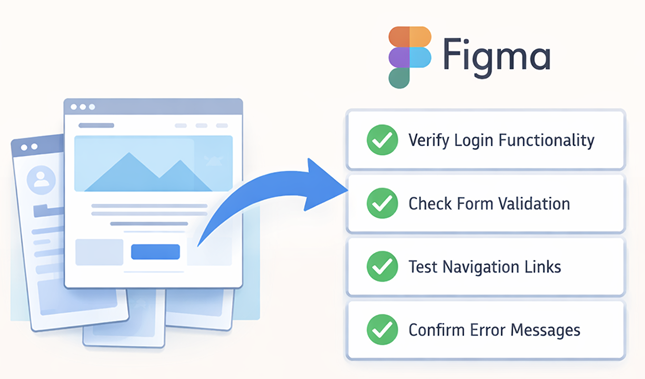
Figma Mockup To Generate Test Case:
Generate a full test suite straight from a Figma design or image.
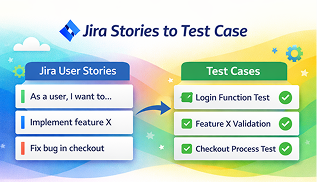
JIRA Stories To Generate Test Case:
Create coverage automatically from your existing JIRA stories.
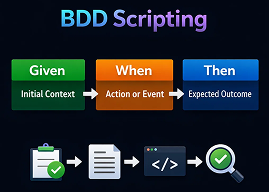
BDD Scripting:
Let the AI produce well-structured test case descriptions and BDD scripts instantly.
BRD to Test Case:
Generate test cases directly from BRD documents.

Agile Board
The Agile Board provides a visual workspace to plan, track, and manage testing tasks with ease. It helps teams collaborate effectively, monitor progress in real time, and stay aligned throughout the testing lifecycle.

In-Built Timesheet
QA Touch includes a built-in timesheet feature to track work hours accurately and effortlessly. Create, customize, and share timesheets to improve time management, productivity tracking, and reporting across teams.

Built-in Bug Tracking
QA Touch offers seamless built-in defect tracking by linking bugs directly to failed test cases. Log, track, and manage defects effortlessly from reporting to closure using a centralized bug tracking module that ensures complete visibility and faster resolution.

Intuitive Dashboards
Get a clear, real-time overview of your testing progress with intuitive dashboards. Access project-specific insights into test cases, test runs, defects, and user activity logs—all consolidated in one place for smarter decision-making.

Reports & Actionable Insights
QA Touch delivers rich, actionable reports that provide deep visibility into test coverage, execution status, defect history, and team performance. Identify risks early, track quality trends, and continuously improve your testing outcomes.

Cost-Effective & Scalable
QA Touch offers flexible and affordable pricing plans designed for startups, growing teams, and enterprises. With a generous free trial and feature-rich paid plans, you get maximum value without compromising on quality or functionality.
Which Features Do QA Touch and Xray Both Offer?
Based on the comparison table, both QA Touch and Xray offer:
- Test Case Management & Reusability
- Review Management
- AI Helper
- Test Execution
- Import of Test Cases (.csv, .xls, .xlsx)
- Configurable Custom Roles & Permissions
- Activity Log
- Audit Log
- Sharable Test Cases, Test Results
- RTM - Jira Requirements Traceability Matrix
- Integrations
- Jira Integration - 2 Way
- Jira Cloud Plugin
- Test automation & API
- Google SSO
- Two-factor auth & enforce
- Custom Dashboard
- Test Case Version History (QA Touch: Professional & Enterprise; Xray: Enterprise)
- Customer Support
- Knowledge Base
What Does QA Touch Offer That Xray Does Not?
Based on the comparison table, QA Touch provides the following capabilities that Xray does not:
- Bulk Update of Test Cases (with .csv)
- Sharable Reports
- Sharable Dashboards
- Defect Tracking & Traceability (Req → Test → Defect)
- Inbuilt Mindmap
- Timesheets
- Workspace
What Does Xray Offer That QA Touch Does Not?
Based on the comparison table, Xray supports Single sign-on (SAML), which QA Touch does not. QA Touch supports Google SSO.
How Does QA Touch Pricing Compare to Xray Pricing?
QA Touch charges only for QA Touch users, not based on the number of Jira users, and the QA Touch Jira plugin is free. Xray pricing is based on the number of Jira users, irrespective of the number of Xray users.
Frequently Asked Questions
What is the difference between QA Touch and Xray?
Both tools cover core test management, test execution, Jira RTM, two-way Jira integration, and test automation and API. QA Touch also offers bulk CSV updates, sharable reports and dashboards, defect traceability, an inbuilt mindmap, timesheets, and workspaces, while Xray offers SAML single sign-on.
How is QA Touch priced compared to Xray?
QA Touch charges only for QA Touch users, not the number of Jira users, and its Jira plugin is free. Xray is priced based on the number of Jira users, irrespective of Xray users.
Does QA Touch integrate with Jira like Xray?
Yes. Both QA Touch and Xray offer two-way Jira integration, a Jira Cloud plugin, and a Jira Requirements Traceability Matrix (RTM).
Does QA Touch support SAML single sign-on?
No. According to the comparison, Single sign-on (SAML) is available in Xray but not in QA Touch. QA Touch supports Google SSO and two-factor authentication.
Can I bulk update test cases with a CSV in Xray?
According to the comparison, bulk update of test cases with CSV is available in QA Touch but not in Xray.
Which plans include test case version history?
In QA Touch, test case version history is available on the Professional and Enterprise plans. In Xray, it is available on the Enterprise plan.
Can I share reports and dashboards in QA Touch and Xray?
QA Touch supports sharable reports and sharable dashboards; Xray does not. Both tools support sharing test cases and test results.