Import Test Cases into a Specific Module | QA Touch
How to Import Test Cases into a Specific Module in QA Touch
QA Touch module-wise import lets you import test cases directly into an individual module. From the Test Cases list page, you create a new module or choose an existing one, click the Import icon, upload your test case file, map the required fields, and click Import. The uploaded test cases are then added to the selected module.
At a Glance: Module-Wise Test Case Import
| What it does | Imports test cases into an individual module in QA Touch |
| Where | Test Cases list page → select a module → Import icon |
| Input | Your test case file (a sample file is available for reference) |
| Required action | Map the required fields |
| Output | Test cases added to the selected module |
What Is Module-Wise Import in QA Touch?
Module-wise import is a QA Touch option to import test cases into an individual module. You start the import from a new or existing module, and every uploaded test case is added to that module.
How to Import Test Cases Module-Wise in QA Touch
To import test cases into a module, select or create the module on the Test Cases list page, click the Import icon, upload your test case file, map the required fields, and click Import.
Step 1: Select or Create a Module
- Login to QA Touch.
- Goto Test cases list page
- Create a New module / Choose a existing module
- Click on Import icon
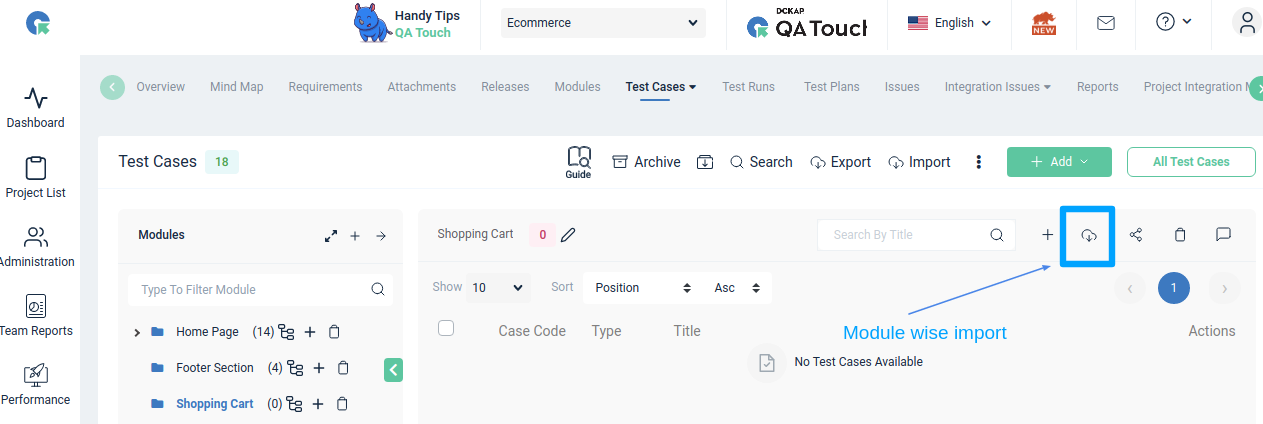
Step 2: Upload, Map, and Import Your Test Cases
- In Import page, upload your Test case file(Download sample file for reference)
- Map the required fields and click on Import
- Now uploaded test cases will be added to selected module
Frequently Asked Questions
Can I import test cases into a specific module in QA Touch?
Yes. QA Touch lets you import test cases into an individual module by selecting the module on the Test Cases list page and clicking the Import icon.
Can I import test cases into a new module?
Yes. You can create a new module or choose an existing module before clicking the Import icon.
Where is the Import icon for module-wise import?
The Import icon is on the Test Cases list page, where you select or create the module you want to import into.
Is there a sample file for module-wise import?
Yes. You can download a sample file from the Import page for reference before uploading your test case file.
Where do the imported test cases go?
After you map the required fields and click Import, the uploaded test cases are added to the selected module.