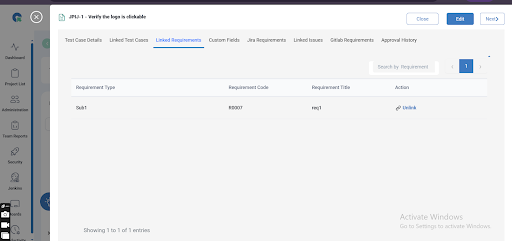
Mapped Requirement
The Mapped Requirement section helps you understand how each requirement is linked to its corresponding test cases within a project. This ensures complete traceability, making it easier to validate that every requirement has been covered by at least one test case.
This report is essential for QA teams who follow requirement-based testing or need compliance-level documentation
How to Access the Mapped Requirement
- Go to the Test case module.
- click on a Test Case.
- Select Linked Requirement.
- The page will list all requirements with their associated test cases.
1. Requirement-to-Test Case Traceability
View all test cases mapped to each requirement, ensuring nothing is missed during testing.
2. Unlink Requirement
Clicking on the unlink option will unlink the requirement from the respective Test case